8M Genius - Contact API Documentation
RESTful API for managing CRM contacts, leads, tags, stages, quality, and ownership
Authentication
All API requests require authentication using a Bearer token. Include your API token in the Authorization header of each request.
Authorization Header
Authorization: Bearer YOUR_API_TOKEN
How to Get Your API Token
You can obtain your API token from your account settings. The token is associated with your account and should be kept secure.
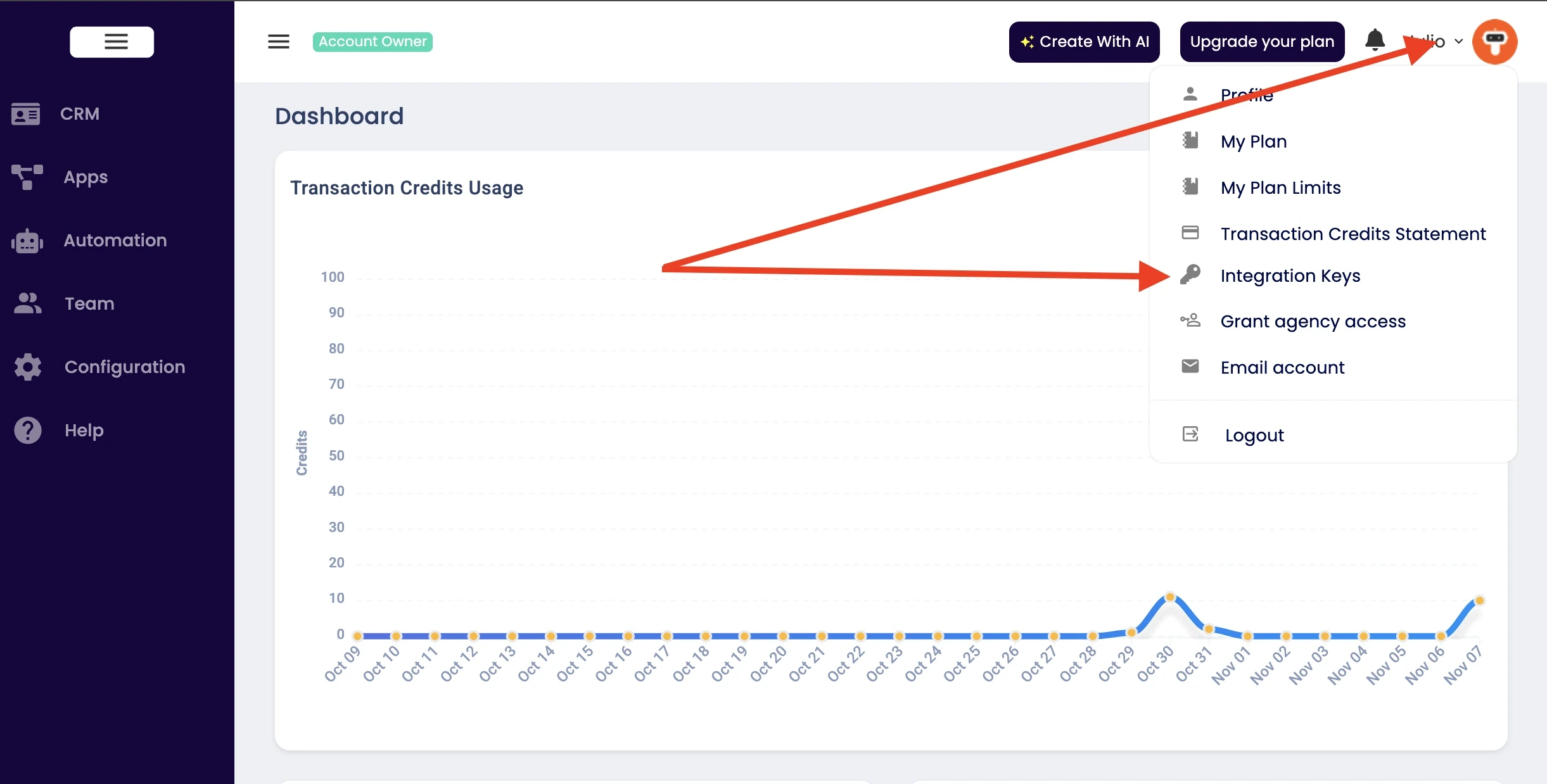
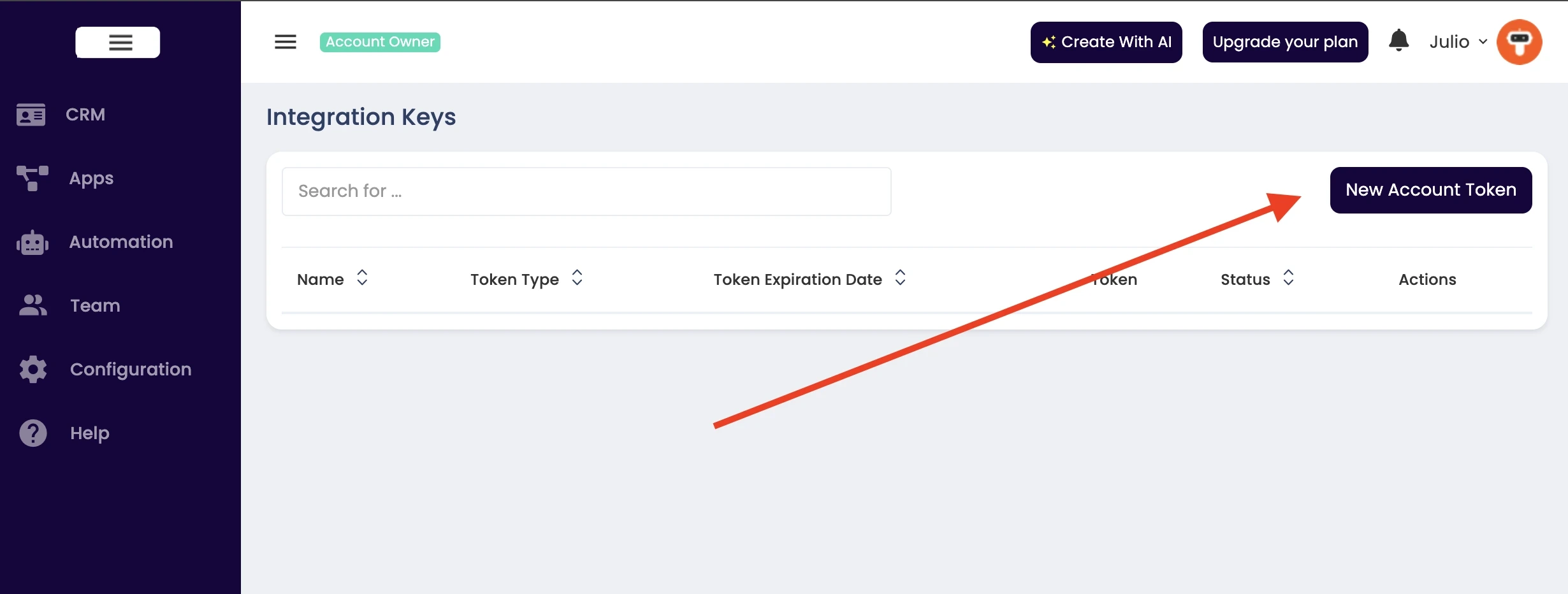
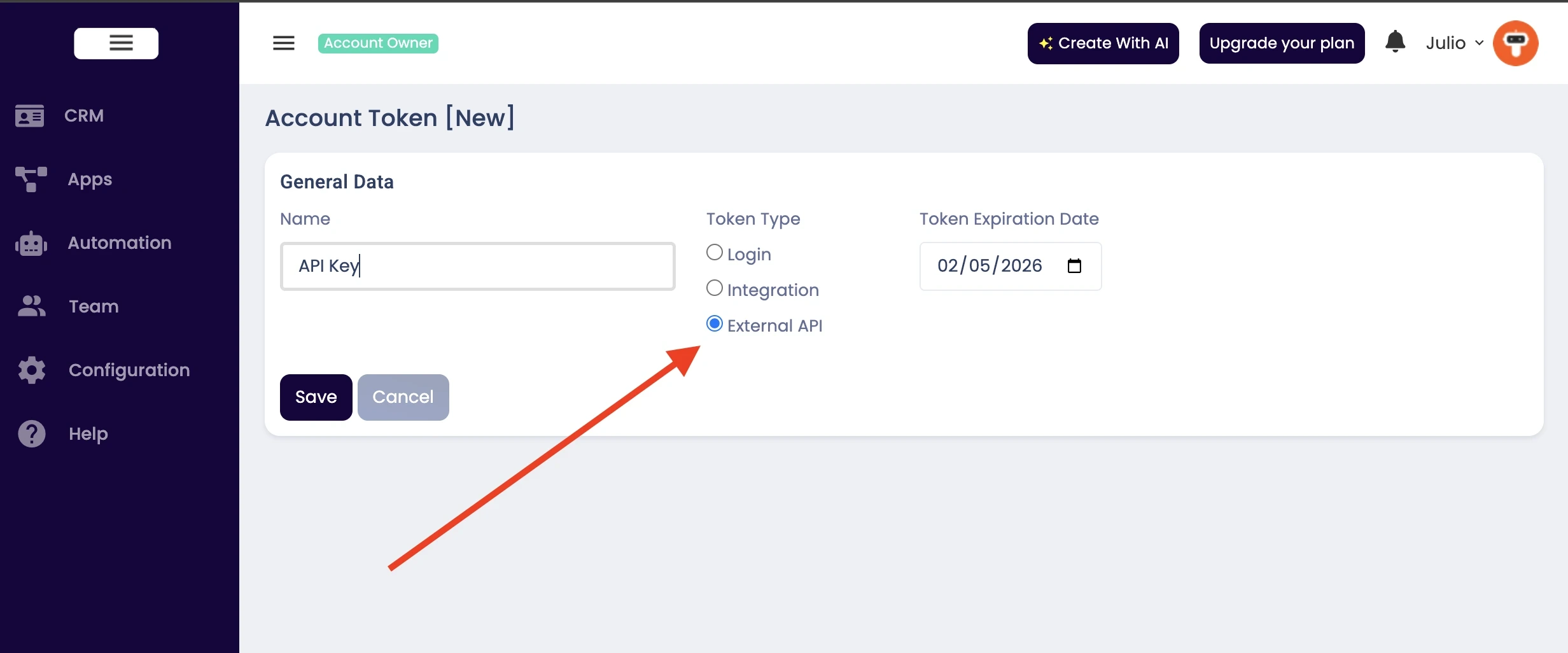
IMPORTANT: Only users with the Starter, Pro, or Business plans have access to the API. For Free and Express plans the API is not available.
Base URL
https://contact-api.8mgenius.com.br
Create Contact
Creates a new contact or lead in the system.
Request Body
| Parameter | Type | Required | Description |
|---|---|---|---|
name |
string | Optional* | Full name of the contact (will be split into firstName and lastName) |
firstName |
string | Optional* | First name of the contact |
lastName |
string | Optional* | Last name of the contact |
email |
string | Optional** | Email address of the contact |
phone |
string | Optional** | Phone number of the contact |
businessName |
string | Optional | Business or company name |
birthday |
string | Optional | Birthday (format: YYYY-MM-DD) |
address |
string | Optional | Street address |
city |
string | Optional | City |
state |
string | Optional | State or province |
zipcode |
string | Optional | ZIP or postal code |
timeZone |
string | Optional | Time zone |
value |
string | Optional | Projected value or deal amount |
stageName |
string | Optional | Name of the stage (must exist in your account) |
qualityName |
string | Optional | Name of the quality (must exist in your account) |
ownerEmail |
string | Optional | Email of the team member who will own this contact |
snapshot |
string | Optional | Summary or snapshot information about the contact |
note |
string | Optional | Initial note to add to the contact |
tags |
array | Optional | Array of tag names (will be created if they don't exist) |
name OR (firstName/lastName) is required.** At least one of
email or phone must be provided.
Example Request
POST /api/contact
Authorization: Bearer YOUR_API_TOKEN
Content-Type: application/json

{
  "name": "John Doe",
  "email": "john@example.com",
  "phone": "+15551234567",
  "businessName": "Acme Corp",
  "city": "New York",
  "state": "NY",
  "value": "5000",
  "stageName": "New Lead",
  "qualityName": "High",
  "ownerEmail": "sales@yourcompany.com",
  "snapshot": "Interested in enterprise solution, contacted via website",
  "note": "Initial contact made through website form",
  "tags": ["Hot Lead", "Website", "Q1 2024"]
}
Example Response
{
  "success": true,
  "message": "Contact created successfully",
  "data": {
    "uid": "ABC12345",
    "email": "john@example.com",
    "phone": "+15551234567",
    "firstName": "John",
    "lastName": "Doe"
  }
}
Get Contact
Retrieves one or more contacts based on the identifier provided.
Query Parameters
| Parameter | Type | Required | Description |
|---|---|---|---|
uid |
string | Optional* | Unique identifier of the contact (returns single contact) |
email |
string | Optional* | Email address of the contact(s) (may return multiple contacts) |
phone |
string | Optional* | Phone number of the contact(s) (may return multiple contacts) |
uid, email, or phone is required.
Example Request
GET /api/contact?uid=ABC12345
Authorization: Bearer YOUR_API_TOKEN
Example Response (Single Contact)
{
  "success": true,
  "message": "Contact retrieved successfully",
  "data": {
    "uid": "ABC12345",
    "email": "john@example.com",
    "phone": "+15551234567",
    "firstName": "John",
    "lastName": "Doe",
    "businessName": "Acme Corp",
    "address": "123 Main St",
    "city": "New York",
    "state": "NY",
    "zipcode": "10001",
    "timeZone": "America/New_York",
    "value": "5000",
    "stageName": "New Lead",
    "qualityName": "High",
    "ownerEmail": "sales@yourcompany.com",
    "snapshot": "Interested in enterprise solution",
    "notes": "2025-08-12 09:35 Talked to lead and he said to call back in 2 days.\n\n2025-08-14 10:46 Called as requested and sent the prices.",
    "tags": ["Hot Lead", "Website"],
    "created": "2024-01-15T10:30:00Z",
    "lastUpdate": "2024-01-15T14:20:00Z"
  }
}
Example Response (Multiple Contacts)
{
  "success": true,
  "message": "2 contacts found",
  "data": [
    {
      "uid": "ABC12345",
      "email": "john@example.com",
      "phone": "+15551234567",
      "firstName": "John",
      "lastName": "Doe"
    },
    {
      "uid": "XYZ67890",
      "email": "john@example.com",
      "phone": "+15559876543",
      "firstName": "John",
      "lastName": "Smith"
    }
  ]
}
Update Contact
Updates an existing contact. Only the fields provided will be updated; omitted fields remain unchanged.
Request Body
| Parameter | Type | Required | Description |
|---|---|---|---|
uid |
string | Required | Unique identifier of the contact to update |
name |
string | Optional | Full name (will be split into firstName and lastName) |
firstName |
string | Optional | First name |
lastName |
string | Optional | Last name |
email |
string | Optional | Email address |
phone |
string | Optional | Phone number |
businessName |
string | Optional | Business or company name |
birthday |
string | Optional | Birthday (format: YYYY-MM-DD) |
address |
string | Optional | Street address |
city |
string | Optional | City |
state |
string | Optional | State or province |
zipcode |
string | Optional | ZIP or postal code |
timeZone |
string | Optional | Time zone |
value |
string | Optional | Projected value or deal amount |
stageName |
string | Optional | Name of the stage |
qualityName |
string | Optional | Name of the quality |
ownerEmail |
string | Optional | Email of the team member who will own this contact |
snapshot |
string | Optional | Summary or snapshot information about the contact |
tags |
array | Optional | Array of tag names to add (additive only) |
Example Request
PUT /api/contact
Authorization: Bearer YOUR_API_TOKEN
Content-Type: application/json

{
  "uid": "ABC12345",
  "city": "Los Angeles",
  "state": "CA",
  "value": "10000",
  "stageName": "Qualified",
  "snapshot": "Follow-up scheduled for next week. Very interested in premium package.",
  "tags": ["Premium Interest"]
}
Example Response
{
  "success": true,
  "message": "Contact updated successfully",
  "data": {
    "uid": "ABC12345",
    "email": "john@example.com",
    "phone": "+15551234567",
    "firstName": "John",
    "lastName": "Doe",
    "city": "Los Angeles",
    "state": "CA",
    "value": "10000",
    "stageName": "Qualified",
    "snapshot": "Follow-up scheduled for next week. Very interested in premium package.",
    "tags": ["Hot Lead", "Website", "Premium Interest"]
  }
}
Delete Contact
Permanently deletes a contact from the system.
Query Parameters
| Parameter | Type | Required | Description |
|---|---|---|---|
uid |
string | Required | Unique identifier of the contact to delete |
Example Request
DELETE /api/contact?uid=ABC12345
Authorization: Bearer YOUR_API_TOKEN
Example Response
{
  "success": true,
  "message": "Contact deleted successfully",
  "data": {
    "uid": "ABC12345"
  }
}
Add Tag to Contact
Adds a tag to a contact. If the tag doesn't exist, it will be created automatically.
Request Body
| Parameter | Type | Required | Description |
|---|---|---|---|
uid |
string | Optional* | Unique identifier of the contact |
email |
string | Optional* | Email address of the contact |
phone |
string | Optional* | Phone number of the contact |
tagName |
string | Required | Name of the tag to add |
uid, email, or phone is required.
Example Request
POST /api/contact/tag/add
Authorization: Bearer YOUR_API_TOKEN
Content-Type: application/json

{
  "uid": "ABC12345",
  "tagName": "VIP Customer"
}
Example Response
{
  "success": true,
  "message": "Tag added to contact successfully",
  "data": {
    "contactUid": "ABC12345",
    "contactEmail": "john@example.com",
    "contactPhone": "+15551234567",
    "tagName": "VIP Customer"
  }
}
Add Note to Contact
Adds a note to a contact's history. Notes are timestamped and stored chronologically.
Request Body
| Parameter | Type | Required | Description |
|---|---|---|---|
uid |
string | Optional* | Unique identifier of the contact |
email |
string | Optional* | Email address of the contact |
phone |
string | Optional* | Phone number of the contact |
note |
string | Required | Note content to add to the contact |
uid, email, or phone is required.
Example Request
POST /api/contact/note/add
Authorization: Bearer YOUR_API_TOKEN
Content-Type: application/json

{
  "uid": "ABC12345",
  "note": "Customer called to inquire about enterprise pricing. Scheduled demo for next Tuesday at 2 PM."
}
Example Response
{
  "success": true,
  "message": "Note added to contact successfully",
  "data": {
    "contactUid": "ABC12345",
    "contactEmail": "john@example.com",
    "contactPhone": "+15551234567",
    "note": "Customer called to inquire about enterprise pricing. Scheduled demo for next Tuesday at 2 PM."
  }
}
Change Contact Stage
Updates the stage of a contact in your sales pipeline.
Request Body
| Parameter | Type | Required | Description |
|---|---|---|---|
uid |
string | Optional* | Unique identifier of the contact |
email |
string | Optional* | Email address of the contact |
phone |
string | Optional* | Phone number of the contact |
stageName |
string | Required | Name of the stage (must exist in your account) |
uid, email, or phone is required.
Example Request
PUT /api/contact/stage
Authorization: Bearer YOUR_API_TOKEN
Content-Type: application/json

{
  "uid": "ABC12345",
  "stageName": "Qualified"
}
Example Response
{
  "success": true,
  "message": "Contact stage updated successfully",
  "data": {
    "contactUid": "ABC12345",
    "contactEmail": "john@example.com",
    "contactPhone": "+15551234567",
    "stageName": "Qualified"
  }
}
Change Contact Quality
Updates the quality level of a contact (e.g., High, Medium, Low).
Request Body
| Parameter | Type | Required | Description |
|---|---|---|---|
uid |
string | Optional* | Unique identifier of the contact |
email |
string | Optional* | Email address of the contact |
phone |
string | Optional* | Phone number of the contact |
qualityName |
string | Required | Name of the quality level (must exist in your account) |
uid, email, or phone is required.
Example Request
PUT /api/contact/quality
Authorization: Bearer YOUR_API_TOKEN
Content-Type: application/json

{
  "phone": "+15551234567",
  "qualityName": "High"
}
Example Response
{
  "success": true,
  "message": "Contact quality updated successfully",
  "data": {
    "contactUid": "ABC12345",
    "contactEmail": "john@example.com",
    "contactPhone": "+15551234567",
    "qualityName": "High"
  }
}
Change Contact Owner
Changes the owner (team member) assigned to a contact.
Request Body
| Parameter | Type | Required | Description |
|---|---|---|---|
uid |
string | Optional* | Unique identifier of the contact |
email |
string | Optional* | Email address of the contact |
phone |
string | Optional* | Phone number of the contact |
ownerEmail |
string | Required | Email of the team member who will own the contact |
uid, email, or phone is required.
Example Request
PUT /api/contact/owner
Authorization: Bearer YOUR_API_TOKEN
Content-Type: application/json

{
  "uid": "ABC12345",
  "ownerEmail": "sales@yourcompany.com"
}
Example Response
{
  "success": true,
  "message": "Contact owner updated successfully",
  "data": {
    "contactUid": "ABC12345",
    "contactEmail": "john@example.com",
    "contactPhone": "+15551234567",
    "ownerEmail": "sales@yourcompany.com",
    "ownerName": "Jane Smith"
  }
}
Response Format
All API responses follow a consistent JSON format.
Success Response
{
  "success": true,
  "message": "Operation completed successfully",
  "data": {
    // Response data object
  }
}
Error Response
{
  "success": false,
  "error": "Error message describing what went wrong",
  "code": "ERROR_CODE"
}
HTTP Status Codes
| Status Code | Meaning | Description |
|---|---|---|
| 200 | OK | Request succeeded |
| 201 | Created | Resource was successfully created |
| 400 | Bad Request | Invalid request parameters or missing required fields |
| 401 | Unauthorized | Invalid or missing authentication token |
| 403 | Forbidden | Valid token but insufficient permissions |
| 404 | Not Found | Requested resource does not exist |
| 405 | Method Not Allowed | HTTP method not supported for this endpoint |
| 500 | Internal Server Error | Server error occurred while processing the request |
Error Codes
| Code | Description |
|---|---|
AUTH_ERROR |
Authentication failed |
BAD_REQUEST |
Invalid request parameters |
UNAUTHORIZED |
Invalid or missing token |
FORBIDDEN |
Access denied |
NOT_FOUND |
Resource not found |
METHOD_NOT_ALLOWED |
HTTP method not supported |
SERVER_ERROR |
Internal server error |
Rate Limiting
To ensure fair usage and system stability, API requests may be rate-limited. If you exceed the rate limit, you will receive a 429 Too Many Requests response.
Support
If you have questions or need assistance with the API, please contact our support team.